![logo-full-landscape-1024-1.png]](https://help.bopple.com/hs-fs/hubfs/logo-full-landscape-1024-1.png?width=100&height=31&name=logo-full-landscape-1024-1.png)
What capacity management does
Capacity management limits how much is scheduled into each pre-order time slot. When a slot is full, customers are prompted to select another time, so orders spread across service instead of crowding into the busiest times.
There are two types of capacity, and you can use them on their own or together:
- Kitchen capacity limits how much your kitchen has to have ready in each slot. You can limit orders, items from chosen categories, or both.
- Driver capacity limits how many deliveries are due in each slot. It's for businesses using their own drivers.
Before you start
- All settings are within Fulfilment → Pre-ordering, and each location sets its own.
- Order scheduling must be on for pick-up and delivery while any capacity limit is on. ASAP ordering is turned off, so every customer picks a time.
- Limits apply to each scheduling time slot (for example, every 10 minutes). Kitchen and driver capacity use the same slot length.
- Limits only apply to online pick-up and delivery orders. Kiosk, catering, dine-in/QR orders, and orders entered directly in your POS are not counted or limited.
⚠️ Limits set too low can cost you sales
When a time slot is full, customers have to choose a different time and some won't order at all.
Kitchen capacity 🍕
Kitchen capacity is based on when each order needs to be ready:
- Pick-up orders count towards the slot they're picked up in.
- Delivery orders count towards the slot they need to be ready by, not their delivery time. This is based on the Drive time (mins) setting you have applied in Fulfilment → Operations. With a 30-minute drive time, an order due for delivery at 7:00pm counts towards the 6:30pm slot for kitchen capacity limits.
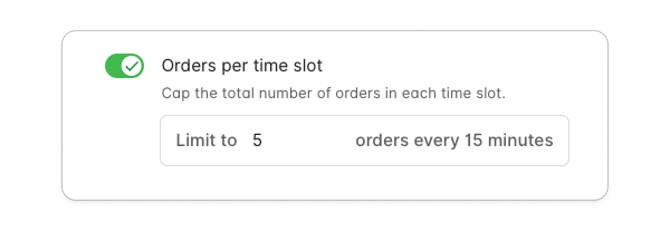
Orders per time slot
Sets the most orders your kitchen takes in each slot, whatever their size. Once a slot has that many orders, it's full. Use it when the number of orders is what slows you down, such as packing and handing over orders at a busy counter.
Items per time slot
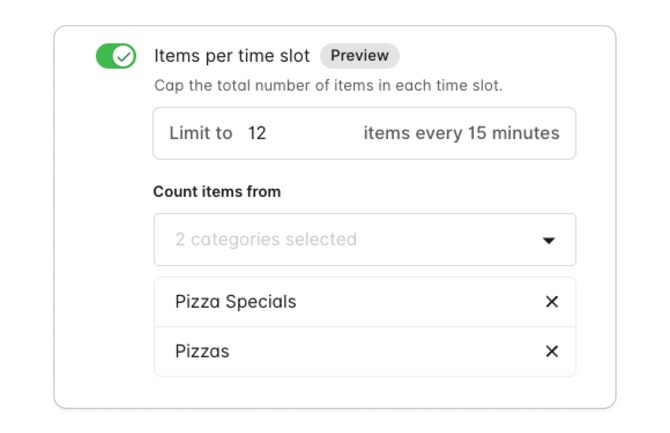
🧪 Item limits are in preview. This new feature is available on request while we gather feedback. How it works may change before general release.
Sets the most items your kitchen takes in each slot. Use it when part of your kitchen has a fixed capacity, such as a pizza oven that can only cook so many pizzas at once. Under Count items from, choose All categories or just the ones to count, such as your pizza categories.
We designed item limits based on merchant feedback. At peak, many customers choose the same popular times, and that's hard to manage when part of your kitchen can only cook or prepare so much at once. Item limits aren't designed to block one-off large orders, so you always keep the sale and the customer. If you'd like more tools for managing large orders, add your suggestion to our Roadmap in Back Office.
How it works
- The first order in an empty slot is always accepted, however many items it has.
- Every order after that must fit in the space left. If it doesn't, that time isn't available and the customer selects another.
- Only counted items count. Modifiers and add-ons never count, and neither do items from categories you didn't choose.
Examples with a limit of 6 pizzas per slot:
|
Slot already has |
New order |
Result |
|---|---|---|
|
Nothing |
4 pizzas |
Accepted. 2 spaces left. |
|
4 pizzas |
2 pizzas |
Accepted. Slot is now full. |
|
4 pizzas |
3 pizzas |
Not available. Customer selects another time. |
|
Nothing |
8 pizzas |
Accepted, as the first order. Slot is now full. |
|
10 pizzas |
1 pizza |
Not available. Slot is full. |
|
6 pizzas |
Drinks only |
Accepted. Drinks aren't counted. |
Choosing your limit
- Count only what's constrained. If the oven is the bottleneck, count just the categories it cooks.
- Base it on a real slot. Use the number of items your kitchen can finish in one slot on a busy night.
- Allow for typical orders. Most orders have one to three items, so a limit below that blocks ordinary orders.
- Start generous and review after a week. If customers are often pushed to later times at peak, try raising it.
Using both kitchen limits
An order must fit both limits. A slot is full as soon as either the order limit or the item limit is reached.
Driver capacity 🛵
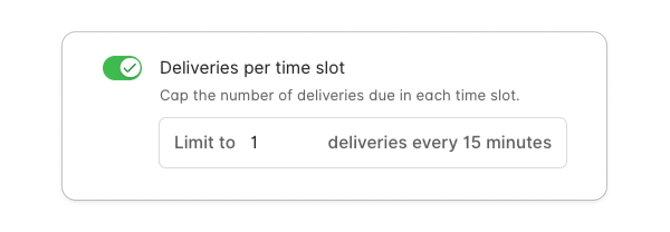
Deliveries per time slot sets the most deliveries that can be due in each slot. It's designed for businesses using their own drivers – it is not needed when a delivery partner handles your deliveries.
- Deliveries count towards the slot of their scheduled delivery time.
- Every delivery counts as 1, whatever its size.
- When a slot is full, delivery customers select another time. Pick-up orders aren't affected, so the same time can still be booked for pick-up.
With kitchen limits on too, a delivery time is only available if both:
- the driver slot at the delivery time has room, and
- the kitchen slot it needs to be ready by has room.
For example, with a 30-minute delivery time, a delivery for 7:00pm needs room in the 7:00pm driver slot and the 6:30pm kitchen slot.
Setting it up
- Go to Fulfilment → Pre-ordering
- Under Order scheduling, check scheduling is on for pick-up and delivery, and choose your Scheduling time slots – we recommend 15min time slots.
- Under Kitchen capacity, enable your preferred type of limit. You do not need to use both, but you can.
- For item limits, choose what to count under Count items from.
- If you use your own drivers, under Driver capacity, turn on Deliveries per time slot and enter your limit.
🧪 Item limits are in preview. This new feature is available on request while we gather feedback. How it works may change before general release.
Good to know
- Cancellations: A cancelled order frees up its space.
- Changing a limit: Orders already placed aren't affected. The new limit applies to new orders.
- Pre-orders outside opening hours: If you allow these, customers can still only select times during opening hours, and limits still apply.